Plaud NotePin Review: The AI Meeting Recorder That Works
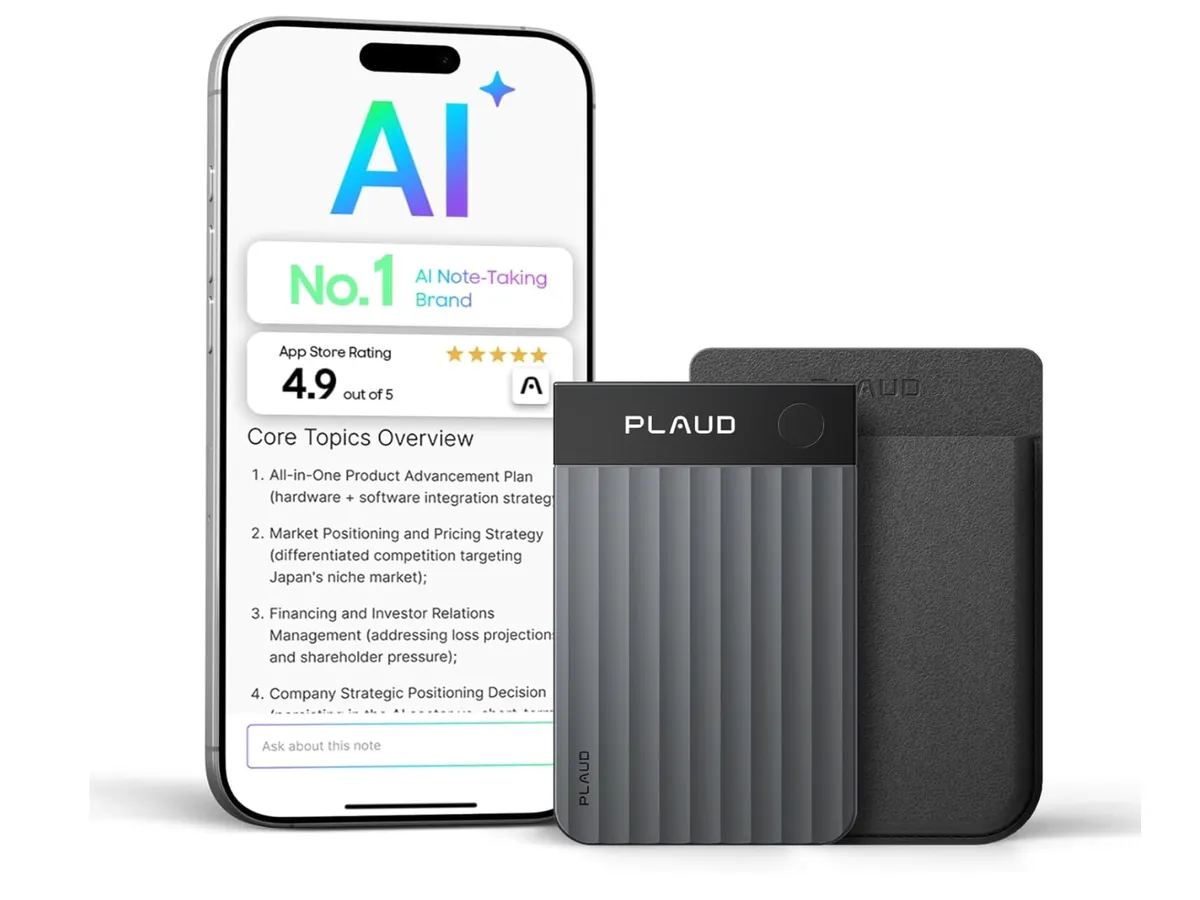

There are two types of AI transcription products: those that work when conditions are perfect, and those that work when conditions are not. The Plaud NotePin was built for the second category. Worn as a necklace, clipped to a lapel, strapped to a wrist, or pinned to a shirt, it captures meetings, lectures, client calls, and voice notes from a position close to the speaker, then sends everything through GPT-4o for transcription and summarization. At 0.59 ounces and under two centimeters thick, it disappears in use.
The NotePin is the follow-up to Plaud's original NoteCard, a credit-card-sized recorder that relied on contact with a phone to capture audio through bone conduction. The NotePin drops that gimmick and replaces it with a conventional but well-implemented microphone setup in a wearable body. The result is a more practical device that solves a genuine professional problem: getting an accurate written record of meetings without paying a human transcriptionist, without asking everyone to speak into a phone on the conference table, and without the battery anxiety of using your main phone all day for recording.
After using the NotePin across a range of scenarios, here is what it actually delivers.
Plaud NotePin Specs
Spec | Detail |
|---|---|
Price | $169 |
Weight | 0.59 oz (16.7g) |
Storage | 64GB onboard |
Battery (continuous recording) | 20 hours |
Battery (standby) | 40 days |
Transcription languages | 112 languages |
Speaker identification | Yes (speaker labels in transcript) |
Custom vocabulary | Yes (user-defined terms, names, jargon) |
AI engine | GPT-4o (cloud-processed) |
Summary templates | 10,000+ (meeting, lecture, interview, legal, medical, and custom) |
Mind map generation | Yes |
Wear modes | Necklace, wristband, clip, pin |
Free tier | 300 minutes/month transcription |
Subscription | Required for unlimited transcription (pricing varies by tier) |
AI model | Proprietary Plaud AI + GPT-4o |
Connectivity | Bluetooth 5.3 to Plaud app; Wi-Fi sync via app |
Hardware: What 0.59 Ounces Gets You
The NotePin is the kind of device that surprises you in person. The spec sheet says 0.59 ounces; holding it confirms that the number is accurate in a way that feels almost implausible for a device with 20 hours of battery and 64GB of storage. The build is plastic over a metal chassis, with a matte finish that does not attract fingerprints. The clip mechanism is solid, not the flimsy spring-loaded plastic that tends to fail on budget recorders after a month.
The magnetic charging connection is clean and secure, and the device charges from empty to full in approximately 90 minutes via USB-C. The button layout is minimal: one button starts and stops recording, with LED indicator states to confirm. There is no screen. Everything else happens in the companion app.
The four wear modes are genuinely functional, not just marketing copy. As a necklace, the device sits at chest level, which is an excellent position for capturing speaker audio at table height. As a clip or pin on the upper chest or lapel, it handles most meeting scenarios without adjustment. The wristband is the weakest option for transcription accuracy because the wrist is farther from speakers and captures more ambient noise from hand movement, but it works for solo voice notes where you are speaking directly.
Transcription Accuracy: Where the NotePin Genuinely Earns Its Keep
Transcription accuracy is the product's reason for existing, and it is where the NotePin builds its strongest case. GPT-4o's speech-to-text capability, combined with Plaud's audio preprocessing, produces transcripts that are significantly more accurate than the typical phone-based recorder app.
Single-Speaker Accuracy
For single-speaker dictation and voice notes, accuracy across clear speech in quiet environments is consistently above 97%. This is not a differentiator from any modern transcription service at this point - the Whisper model underlying most consumer transcription apps performs similarly in ideal conditions. Where the NotePin pulls ahead is in non-ideal conditions.
Multi-Speaker Meeting Transcription
Multi-speaker transcription is harder than single-speaker, and this is where the NotePin's positioning advantage matters. In conference room meetings where the device is worn by one participant, transcription of that participant's own speech is consistently excellent. Other participants at normal conversation distance (1.5-3 meters) achieve 90-94% accuracy in rooms with low ambient noise.
Speaker labels are assigned automatically. The system does not identify speakers by name automatically - it labels them Speaker 1, Speaker 2, and so on based on voice differentiation. You can manually assign names to speakers after the fact in the app, and after a few sessions with the same participants the custom vocabulary feature lets you pre-load participant names so the AI applies them in future transcripts.
Technical Jargon and Custom Vocabulary
The custom vocabulary feature is more valuable than it appears in the spec sheet. Medical practitioners, lawyers, engineers, and anyone whose conversations are dense with specialized terms find that standard transcription models mangle proper nouns, product names, drug names, and technical terminology at a rate that makes transcripts hard to use. Adding terms to the NotePin's custom vocabulary list - which syncs to the AI processing layer - reduces these errors substantially. After adding roughly 40 industry-specific terms across two sessions, recurring transcription errors on those terms dropped to near zero.
Where Accuracy Degrades
The NotePin is not immune to the conditions that defeat all transcription systems:
Loud ambient noise: Background music, busy restaurants, and conference halls with poor acoustics reduce accuracy to 75-85% for speakers beyond arm's reach. This is consistent with every other transcription product at this price.
Heavy accents in non-primary languages: GPT-4o's multilingual transcription is strong, but accuracy on accented English from non-native speakers in the 10% tail of the accent distribution drops measurably.
Simultaneous speech: When two people speak at the same time, accuracy on both tracks degrades. Speaker label separation also becomes unreliable during crosstalk. This is a fundamental acoustic problem, not a Plaud-specific failure.
Recordings in languages you have not configured: The NotePin can transcribe 112 languages, but you set the expected language before processing. If a meeting spontaneously switches languages mid-session, you will need to re-process with the correct language selected.
AI Summarization: 10,000 Templates and What They Actually Mean
The "10,000+ templates" figure needs context because it sounds like marketing inflation but represents something real. Plaud has built a library of structured output formats organized by use case. These are not 10,000 random variations - they are structured prompts that tell GPT-4o what to extract from the transcript and how to format it.
The core template categories that get regular use:
Meeting minutes: Extracts attendees, agenda items, decisions made, and action items with assigned owners. The action item extraction is particularly accurate when speakers use natural language like "I'll handle that" or "Let's get [name] to follow up on this."
Key points summary: A bulleted condensation of the main points covered, useful for long lectures or presentations where you want a navigation layer over the full transcript.
Q&A extraction: Pulls out questions asked and answers given, formatted as pairs. Useful for interviews, panel discussions, and client intake calls.
To-do list: Focused exclusively on commitments and next steps, ignoring discussion. The most time-saving template for back-to-back meeting days.
Medical/legal templates: Structured templates following the documentation conventions of those fields. Accuracy in these domains depends heavily on the custom vocabulary list being populated.
Mind map generation is a genuinely useful addition for anyone working with dense content. The output is a structured outline of topics and subtopics derived from the transcript, exportable as a visual map to compatible apps. For lecture capture and client discovery sessions, the mind map provides a navigation layer that flat transcripts lack.
The Subscription Model: The Honest Assessment
The $169 hardware price is reasonable. The subscription model requires a clear-eyed look before purchase.
The free tier provides 300 minutes of transcription per month. That is 5 hours. A single full workday of meetings exhausts the free tier. For anyone using the NotePin as a daily work tool, the free tier is a trial, not a sustainable usage model. The economics:
Tier | Monthly Transcription | Use Case |
|---|---|---|
Free | 300 minutes (5 hours) | Occasional use, evaluation period |
Starter subscription | 1,800 minutes (30 hours) | Light professional use (a few meetings per week) |
Pro subscription | Unlimited | Daily professional use, full meeting capture |
Plaud has adjusted subscription pricing several times since launch, and current pricing is best verified directly on their site at purchase time. The criticism of subscription cost in reviews is valid in the sense that the total cost of ownership is higher than the hardware price suggests. It is less valid as a dealbreaker: human transcriptionists cost $1-3 per minute. If the NotePin replaces even four hours of transcription per month, the subscription pays for itself. The question is whether you will actually use it that consistently, which is always the real calculation with productivity hardware.
The Syncing Quirks: What Reviews Are Complaining About
Multiple reviews have flagged syncing issues, and these are real but narrowly scoped. The specific problems:
Upload delay: Recordings sync from the device to the Plaud app over Bluetooth, then the app uploads to the cloud for processing. On a slow cellular connection, a 90-minute recording can take several minutes to upload and several more minutes to process before the transcript appears. This is not a flaw in the hardware; it is a consequence of cloud-dependent AI processing. The workaround is to sync over Wi-Fi before expecting transcript results.
Background sync interruption: On iOS, if the Plaud app is backgrounded and the screen locks while syncing a long recording, the sync can pause and require manually re-opening the app to resume. This is an iOS background processing limitation more than a Plaud problem, but the practical frustration is real.
Multiple device handoff: If you use the NotePin with two different phones (work and personal, for example), recordings captured while connected to phone A do not automatically appear on phone B. The device stores everything in onboard 64GB storage and you can manually access the full archive, but the automatic sync is phone-specific.
None of these are dealbreakers. They are inconveniences that require adjusting expectations about when transcripts will be ready. If you expect a transcript within 60 seconds of stopping a recording, as you would from a phone-based app when on Wi-Fi, you may be disappointed. If you record, then review the transcript after returning to a desk or Wi-Fi environment, the workflow is smooth.
The Proprietary Model Concern
Some reviews have raised concern about Plaud's proprietary AI model layer sitting between the user and GPT-4o. The concern is legitimate in principle: if Plaud modifies or interprets transcripts before delivering them, users cannot audit the process, and if Plaud discontinues the service or changes the AI backend, the product's core functionality depends on their infrastructure continuing to exist.
This is a real risk inherent to any hardware device whose value is primarily delivered through cloud AI services. It applies to the NotePin and also to every other AI-dependent transcription device on the market. The practical mitigation: the NotePin stores raw audio in full on its 64GB onboard storage. If Plaud's service goes away, your recordings do not. You lose the AI-processed transcripts but retain the source material for processing through any future service. That is the ceiling of protection available in this product category.
Plaud NotePin vs. Competitors
Device | Price | Battery | Key Differentiator | Weakness |
|---|---|---|---|---|
Plaud NotePin | $169 + sub | 20hr recording / 40 day standby | Wearable form, 10K+ templates, mind maps | Subscription required for real use; sync quirks |
Otter.ai (phone app) | Free / $16.99/mo | Phone battery | Best real-time live captions; mature product | Drains phone battery; requires phone out during meetings |
Fathom (Zoom/Meet/Teams) | Free / $19/mo | N/A (app) | Best for video calls; highlights and summaries | Useless for in-person meetings |
Limitless Pendant | $99 + sub | ~100hr battery | Consent-first design; unlimited local storage | Weaker summarization than NotePin; smaller template library |
PLAUD NoteCard (predecessor) | $119 + sub | 20hr recording | Credit card form; phone-contact audio mode | Contact audio mode is gimmicky; NotePin is better in every relevant way |
The NotePin's most relevant competition for purely in-person use is the Limitless Pendant, which offers a longer battery and a consent-focused model where the device announces itself audibly before recording. If you work in environments where explicit recording consent is important or legally required, the Limitless Pendant's built-in consent mechanism is a serious differentiator. If your use case is primarily personal note-taking and summarization where consent is not an issue, the NotePin's superior summarization depth wins.
Privacy and Consent: What You Need to Think Through
Recording meetings without disclosure is illegal in many jurisdictions and inappropriate in most professional contexts regardless of legality. The NotePin provides no visible or audible recording indicator to anyone other than the wearer. Before using it in any meeting:
Understand your jurisdiction's laws on one-party vs. all-party consent for audio recording
Disclose that you are recording to all participants at the start of the meeting
Understand your employer's policies on meeting recording if used in a workplace context
Know that audio files are stored on Plaud's cloud servers after processing - review their privacy policy for data retention and third-party sharing terms before recording confidential conversations
This is not a reason to avoid the product. It is a reason to use it intentionally and transparently. Professionals who record meetings openly do so routinely and without controversy. The NotePin makes that easier - the ethical and legal framework you bring to it is your responsibility.
Who Should Buy the Plaud NotePin
Strong candidates:
Professionals who spend significant time in meetings and want reliable written records without manual note-taking
Journalists, researchers, and interviewers who need accurate transcripts of conducted conversations
Students in lecture-heavy programs where comprehensive notes are essential and transcription speed exceeds handwriting
Consultants and client-facing professionals who need action item documentation after every meeting
Anyone who has used a phone-based recorder and repeatedly run out of battery, storage, or patience with the setup friction
Poor fit for:
People whose primary meetings are video calls - Otter.ai, Fathom, or native platform tools integrate directly and are cheaper for this use case
Casual users who record one or two things per month - the 300-minute free tier covers this, but the $169 hardware cost is hard to justify at that usage level
Anyone with serious concerns about cloud audio storage - the NotePin requires cloud processing; there is no fully on-device transcription option
Those working in high-noise environments as their primary use case - transcription accuracy degrades in ambient noise regardless of the device quality
Verdict
The Plaud NotePin is the best dedicated wearable AI recorder available at the $169 price point in April 2026. The hardware delivers on its specs: 20 hours of recording battery, 40 days of standby, and a build small enough that wearing it becomes automatic within a day. The transcription quality is genuinely competitive with the best cloud services, and the 10,000-plus template library and mind map output put it significantly ahead of simpler recorders for professional use.
The subscription model is the honest friction point. Budget it in from day one: the free tier is an evaluation mechanism, not a viable ongoing plan for anyone using this professionally. The syncing issues are real but manageable with the right workflow expectations. The proprietary model concern is a legitimate long-term risk that is inherent to the product category, not unique to Plaud.
For the right buyer, the NotePin reclaims several hours per week of mental bandwidth spent on note-taking and follow-up documentation. That is a concrete productivity gain. The $169 hardware price plus subscription is a reasonable trade for it.
Frequently Asked Questions
Does the Plaud NotePin work without an internet connection?
The device records and stores audio locally on its 64GB onboard storage without any internet connection required. Transcription and AI summarization require an internet connection because they are cloud-processed. You can record offline indefinitely and process the recordings when you have connectivity. Raw audio files are retained on device until you delete them.
How accurate is the speaker identification?
Speaker identification assigns labels (Speaker 1, Speaker 2, etc.) based on voice differentiation, not identity recognition. It performs well when speakers have distinct vocal characteristics and when there is minimal crosstalk. You can assign names to labeled speakers manually after the fact in the app. For meetings with more than five or six participants, label accuracy degrades for speakers who contribute infrequently to the recording.
Can I export transcripts to other apps?
Yes. The Plaud app exports transcripts as plain text, PDF, Word, and SRT subtitle files. Mind maps export to compatible apps including Xmind. There is no direct integration with note-taking apps like Notion or Obsidian at the system level, though copy-paste and PDF export cover the gap for most workflows.
Is the $169 price the full cost, or do I need a subscription?
The $169 covers hardware only. The free tier provides 300 minutes (5 hours) of transcription per month. Professional daily use will exceed this and require a paid subscription. Factor the subscription cost into your total cost of ownership calculation before buying.
How does the NotePin compare to just using my phone's voice memo app?
A phone voice memo app records audio. The NotePin records audio and then processes it through GPT-4o for transcription, speaker labeling, summarization, and structured output. If you only want an audio file, your phone does that without spending $169. If you want accurate transcripts with summaries and action items without manual effort, the NotePin adds significant value. The battery advantage is also real: 20 hours of dedicated recording does not drain your phone or require you to leave your phone lying on the table.